Loading....
CSS Selectors W3 Schools link

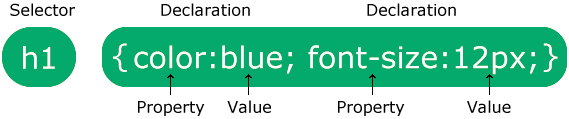
A CSS selector selects the HTML element(s) you want to style.

There are broadly 5 different types of CCS selector as shown in table.


  • Simple Selector
  • Element Selector

    p{text-align: center;color: red;}
  • ID Selector
    id of an element is unique within a page

    #para1{text-align: center;color: red;}
  • Class Selector

    .center{text-align: center;color: red;}
  • Universal Selector

    * {text-align: center;color: blue;}
  • Grouping Selector

    h1, h2, p {text-align: center;color: red;}

    Above example selects all <h1> elements, <h2> elements and all <p> elements

  • Combinator Selector
  • Descendant selector (space)

    div p {background-color: yellow;}
  • Child selector (>)

    div > p {background-color: yellow;}

  • Adjacent sibling selector (+)

    div + p {background-color: yellow;}
  • General sibling selector (~)

    div ~ p {background-color: yellow;}
  • Pseudo-class Selector
  • Anchor Pseudo-classes


    a:link {color: #FF0000;}
    a:visited {color: #00FF00;}
    a:hover {color: #FF00FF;}
    a:active {color: #0000FF;}
  • Pseudo-classes on Hover


    a.highlight:hover {color: #ff0000;}
    div:hover {background-color: blue;}
  • The :first-child Pseudo-class


    p:first-child {color: blue;}
    p:last-child {color: blue;}
    p:first-child div{color: blue;}
    p div:first-child{color: blue;}
    p:nth-child(even){color:blue;}

    p:nth-child(odd){color:blue;}

  • The :lang Pseudo-class

    q:lang(no) {quotes: “~” “~”;}
  • :not(selector)

    p:not(span) {background-color: red}
  • Some Other Examples


    input:checked {accent-color: green;}
    input:disabled {color: red;}
    input:focus {color: red;}
  • Pseudo-elements Selector
  • The ::marker Pseudo-element

    ::marker {color: red;font-size: 23px;}
  • The ::first-line Pseudo-element

    p::first-line {color: #ff0000;font-variant: small-caps;}
  • The ::first-letter Pseudo-element

    p::first-letter {color: #ff0000;font-size: xx-large;}
  • The ::before Pseudo-element

    h1::before {content: url(smiley.gif);}
  • The ::after Pseudo-element

    h1::after {content: url(smiley.gif);}
  • The ::selection Pseudo-element

    ::selection {color: red;background: yellow;}
  • Attribute Selector
  • CSS [attribute] Selector

    a[target] {background-color: yellow;}
  • CSS [attribute=”value”] Selector

    a[target=”_blank”] {background-color: yellow;}
  • CSS [attribute*=”value”] Selector

    [class*=”te”] {background: yellow;}
    Selects all elements with a class attribute value that contains “te”:
  • CSS [attribute~=”value”] Selector

    [title~=”flower”] {border: 5px solid yellow;}
    Selects all elements with a title attribute that contains a space-separated list of words, one of which is “flower”:
  • CSS [attribute^=”value”] Selector

    [class^=”top”] {background: yellow;}
    Selects all elements with a class attribute value that starts with “top”:
  • CSS [attribute$=”value”] Selector

    [class$=”test”] {background: yellow;}
    Selects all elements with a class attribute value that ends with “test”:
  • CSS [attribute|=”value”] Selector

    [class|=”top”] {background: yellow;}
    Select elements with the specified attribute, whose value can be exactly the specified value, or the specified value followed by a hyphen (-).


Last Update: July 10, 2026  

July 8, 2026 23 vikas@crmhike.com  CSS
Total 0 Votes:
0

Tell us how can we improve this post?

+ = Verify Human or Spambot ?

Add A Knowledge Base Question !

You will receive an email when your question will be answered.

+ = Verify Human or Spambot ?

Back To Top

Add A Knowledge Base Question !

You will receive an email when your question will be answered.

+ = Verify Human or Spambot ?